Most finance teams now sit on top of a messy stack of tools: accounting software, billing or subscription systems, banks and payouts, payroll, expenses, spreadsheets, and often a data warehouse on the side. None of these are going away.
Most of the pain isn’t in any one tool it’s in moving, checking, and reconciling data between them:
Copying from emails and PDFs into the ledger
Reconciling bank transactions against invoices and payouts
Chasing approvals and collections via spreadsheets and inboxes
Rebuilding the same reports at month-end
n8n can sit in the middle as an automation layer for finance: connecting systems, enforcing simple rules, and giving you cleaner, reconciled numbers with less manual work. This page looks at concrete workflow examples that are realistic for finance teams and where a specialist n8n agency is useful.
TL;DR
n8n connects your accounting software, billing platform, banks, and reporting tools into automated workflows that enforce controls and reduce manual data entry
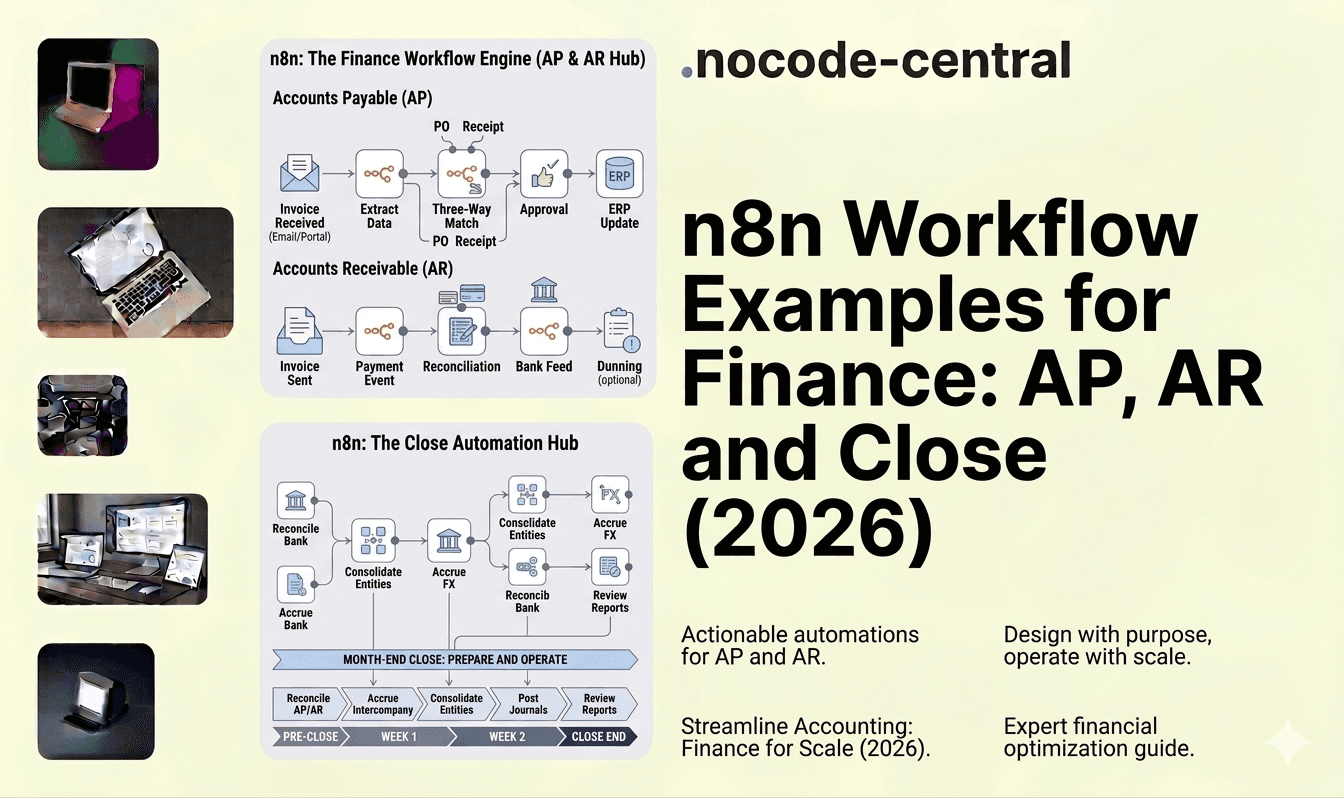
Accounts payable: capture invoices from every channel, extract key data, route structured approvals with audit trails, and write back to your accounting system
Accounts receivable: segment overdue invoices by age and risk, trigger reminder sequences with escalation logic, and alert internal owners when thresholds are breached
Bank reconciliation: pull transactions, classify recurring patterns, match payments against invoices, and surface exceptions instead of routine items
Revenue and billing sync: keep subscription events (upgrades, downgrades, refunds, credits) in sync between Stripe or Chargebee and your general ledger
Month-end close: orchestrate reconciliation tasks, pull trial balances, create accrual checklists, and notify owners when steps are overdue
The average cost of processing an invoice manually is $12 to $18, while automated processing drops that to $2 to $4 per invoice
At Goodspeed, we design finance-grade n8n workflow systems as a certified n8n agency. Book a free consultation or explore our Signal Sprint to scope the right automation architecture for your finance stack.
Top workflow categories for finance teams
Here are the areas where finance workflow automation using n8n tends to deliver the most impact.
Accounts payable (AP) and approvals
Automating intake, coding suggestions, and approvals reduces manual data entry and makes it clear where cash is about to go. Better AP workflows mean fewer errors, more timely postings, and cleaner visibility over liabilities – directly affecting cash forecasting and supplier relationships.
Accounts receivable (AR) and collections
AR automation supports consistent reminders and escalation, without the team living in spreadsheets. This improves cash flow visibility, reduces days sales outstanding (DSO), and cuts write-offs from invoices that “fell through the cracks.”
Bank feeds and reconciliations
For many teams, reconciliations are still a manual, time-boxed slog. Automating parts of classification and matching with n8n shifts effort from routine transactions to genuine exceptions, shortening time-to-close.
Revenue and subscription/billing sync
SaaS and recurring revenue businesses often run a separate subscription system (Stripe, Chargebee, Recurly, etc.) alongside the GL. Keeping these in sync – including upgrades, downgrades, refunds, and credits – is essential for accurate revenue recognition and forecasting.
Reporting and close process automation
Month-end and year-end involve a predictable set of tasks: pulling data, checking balances, preparing journals, reconciling key accounts, and producing packs. Orchestrating these via workflows can reduce time-to-close and cut errors.
Compliance, controls, and audit trails
Approvals, changes to key records, and control checks need to be documented. n8n can help automatically collect evidence, store supporting documents, and log who approved what, when – reducing audit pain later.
The examples below sit inside these categories.
Example workflow #1 – AP intake and approvals
Problem
Invoices arrive as PDFs in shared inboxes, through supplier portals, or attached to tickets. AP staff manually key details into the accounting system, tag the right cost centre, and then chase approvals via email or Slack. There’s no standard approval path, no consolidated audit trail, and limited visibility over where invoices are stuck.
Evaluating whether to build new, migrate, or scale what you have? Book a free consultation. We will give you an honest recommendation in one call.
Workflow (how n8n helps)
A typical n8n workflow our n8n consultants design for AP looks like:
Capture invoices from all channels
Watch a shared AP inbox for new emails with attachments
Pull invoices from specific folders (e.g. “To process”) or document tools
Optionally ingest files uploaded via an internal form or portal
Extract key data (optional but powerful)
Send the document to OCR or extraction tooling to capture vendor, amount, dates, and line items
Apply rules to propose GL accounts, tax codes, cost centres, and entities based on vendor and patterns
Flag anything unusual (e.g. new vendor, out-of-range amount) for extra review
Create draft bills in the accounting platform
Use n8n to create draft bills with the extracted data and proposed coding
Attach the original document and any notes
Trigger structured approvals
Route approval requests via Slack or email with clear actions: approve, reject, reassign, or comment
Use dynamic approver logic (amount thresholds, department owners, project managers)
Log every approval action with timestamp and user
Write back final approvals and coding
Once fully approved, mark the bill as authorised in the accounting system
Apply any coding changes made during the process
Store a consolidated audit trail (e.g. in a data store, doc, or ticketing system)
Result
Less manual data entry and re-keying
Faster, more predictable approvals
A clean audit trail of who approved what, when, and on what basis
Better visibility over upcoming payables and commitments
Evaluating whether to build new, migrate, or scale what you have? Book a free consultation. We will give you an honest recommendation in one call.
Example workflow #2 – AR reminders and collections
Problem
Collections relies on a mix of ad hoc reports, spreadsheets, and individual efforts. Overdue invoices are sometimes chased aggressively, sometimes not at all. Nobody has a consistently updated view of expected cash collections, and manual work scales linearly with the number of customers.
Workflow
An n8n workflow for AR reminders and collections typically:
Pull open invoices and due dates
Connect to the accounting system or billing platform
Fetch all open invoices, due dates, and customer details
Optionally enrich with risk or segment data (e.g. key accounts, high-risk, subscription vs one-off)
Segment and prioritise
Group invoices by age (e.g. upcoming, 0–30, 31–60, 61–90, >90 days overdue)
Identify special cases (e.g. payment plans, disputes, customers under review)
Decide the messaging and cadence based on segment
Trigger reminder sequences
Send polite reminders before due date and shortly after
Escalate wording and include account owner as age increases
For key accounts, notify AM/CSMs instead of sending automated messages
Notify internal owners
Alert account owners or finance when invoices pass specific thresholds (e.g. >30 or >60 days)
Summarise overdue status by owner, customer, or segment
Log statuses back into systems
Update notes or flags on customer or invoice records in the accounting system or CRM
Record when reminders were sent and any replies or disputes logged via other tools
Result
More consistent, repeatable collections processes
Reduced manual checking and spreadsheet maintenance
Improved cash flow and fewer surprises on overdue balances
Clearer visibility for management on where collections stand
Want this done right the first time? Our team has shipped 200+ projects. Book a free consultation and get clarity in one call.
Example workflow #3 – Bank feed and reconciliation support
Problem
Bank feeds are incomplete, delayed, or hard to reconcile for certain accounts (e.g. platform payouts, payment processors, multi-currency accounts). Finance teams spend hours matching transactions manually, especially where multiple small payouts relate to many invoices or where fees and FX are involved.
Workflow
Our workflow automation experts usually design reconciliation support like this:
Pull bank transactions
Connect to bank APIs or import CSV exports on a schedule
Normalise transaction data (dates, descriptions, amounts, currencies)
Classify and pre-code known transactions
Apply rule-based logic to identify recurring vendors, subscriptions, and patterns
Propose GL accounts and tax treatments based on vendor and metadata
Flag unusual or high-value items for special review
Match against existing records
Match payments against open invoices or customer balances
Match payouts from platforms (e.g. PSPs, marketplaces) against internal sales or settlement reports
Handle fees and FX differences, creating suggested journal entries where needed
Push suggested matches into the accounting tool
Create or update transactions with proposed coding and links
Use separate statuses for “auto-cleared” vs “needs review”
Raise exceptions into a review queue
Post unmatched or suspicious items to a Slack channel, internal tool, or dedicated “to review” list
Allow the team to classify and resolve exceptions, with n8n applying those decisions going forward
Result
Faster, more accurate reconciliations
Finance teams focusing on exceptions rather than routine patterns
Less time lost to manual matching and more confidence in bank balances
Additional examples (shorter)
Here are some other accounting automation workflows that finance teams commonly build with our n8n developers.
Revenue and subscription sync
Sync subscription and billing events from systems like Stripe, Chargebee, or Recurly into the accounting system and CRM. Handle new subscriptions, upgrades, downgrades, refunds, and credits with appropriate postings. This supports accurate revenue reporting and a clear view of ARR/MRR across systems. For a broader look at how these patterns apply across SaaS operations, see our n8n workflow examples for SaaS guide.
Month-end close automation
Orchestrate monthly close tasks as workflows: trigger reconciliations, pull trial balances and key reports, create checklists for accruals and prepayments, and notify owners when tasks are due or overdue. Use n8n to gather data into a close pack or folder that’s ready for review.
FX and multi-entity reporting
Fetch FX rates from trusted sources, normalise data across entities and currencies, and generate summary reports or journal templates. This is particularly helpful where groups operate in multiple currencies and need consistent group-level numbers.
Compliance and audit packs
Automatically collect and store supporting documents, approvals, and logs in a standard structure (per period, per process). For example, archive all AP approvals, bank reconciliation evidence, and key control checks in a way that’s easy to hand to auditors without a scramble.
Each example is small on its own. The value compounds when these workflows coordinate with each other – and with the way your team already works.
How we design reliable workflow systems (not just clever hacks)
It’s easy for finance automation to start as a few “clever” scripts, zaps, or scenarios owned by one person. That’s fine until they leave, something breaks, or an auditor starts asking detailed questions.
Our approach as an n8n agency is to design finance-grade systems, not just automations.
Start from finance processes, not tools
We begin with standard processes – procure-to-pay, order-to-cash, record-to-report – and map where data moves, who owns each step, and what controls apply. n8n is then used to support and strengthen those processes, not reinvent them.
Use clear standards for structure and documentation
Our n8n experts:
Organise workflows by process and entity
Name workflows, nodes, and variables consistently
Document inputs, outputs, and assumptions in plain language
This makes it possible for both finance and engineering to understand what a workflow does, which reduces key-person risk.
Not sure where to start? Talk to our team. One call, no obligation, just honest guidance.
Build reusable sub-workflows
Common patterns – posting journals, sending approvals, logging to a data store, sending notifications – are wrapped into reusable sub-workflows. This keeps core logic consistent and reduces errors when things change.
Add explicit error handling, monitoring, and alerts
For workflows that touch the GL, cash, or compliance, our n8n consultants:
Handle predictable error conditions (API failures, missing data, timeouts)
Log failures and unusual events in a structured way
Configure alerts and dashboards so issues are found and fixed quickly
That’s the gap between “automation” and production-grade finance workflow automation.
When to bring in workflow automation experts
Spending on AP invoice automation and e-invoicing software is on track to reach $1.75 billion by 2026, nearly double the 2021 figure. That growth reflects a broader shift from manual, spreadsheet-driven finance operations to production-grade automation layers. For many teams, DIY solutions and internal scripts have already delivered some value. The point to bring in workflow automation experts is when:
You’re managing multiple entities, banks, or billing systems and gluing them together by hand
Critical processes depend on a couple of people’s spreadsheets, zaps, or homegrown scripts. If your current setup runs on Make or Zapier and you are considering a move, our guide to migrating from Make to n8n covers the full process.
The month-end close is slow, fragile, and stressful, and confidence in the numbers arrives late
Audit prep or compliance evidence gathering consumes weeks each year
You know you need a more structured automation layer like n8n but don’t have the bandwidth or in-house experience to design it properly
At that point, using an experienced n8n automation agency is less about outsourcing and more about de-risking and accelerating work you already know you have to do.
Why work with an n8n agency for finance automation
From our side, designing n8n workflows for finance teams usually involves three things.
Experience with finance and operations
We’ve worked on AP, AR, revenue, reporting, and multi-entity workflows. We understand close calendars, materiality, approvals, and audit requirements. That experience shapes how we design automations and where we add controls. See real examples in our n8n case studies.
Ability to bridge finance and technical teams
Our n8n consultants can talk comfortably with Finance Directors and Controllers as well as with engineers and data teams. That’s important when workflows need secure access to systems, robust error handling, and alignment with existing IT policies.
Long-term partnership, not just a one-off build
Some clients want to build a foundation and then take over. Others prefer an ongoing relationship where our n8n experts:
Add new workflows as processes evolve
Optimise existing automations based on feedback
Support finance through crunch periods like year-end or audits
For a breakdown of what these engagements typically cost, see our n8n agency pricing guide. In all cases, the goal is the same: automation that reduces manual work and risk, without turning into a black box.
Book a finance workflow design session
If you’re looking at n8n workflows for finance teams and recognising your own processes in these examples, the next step is simple.
A finance workflow design session typically covers:
Your current finance and accounting stack
The most painful manual processes (AP/AR, close, reporting, audit)
A short, prioritised list of high-impact n8n workflows tailored to your team
How a phased, low-risk rollout could look
Stop Reconciling by Hand
Finance teams that automate AP, AR, reconciliation, and close workflows consistently close faster, catch errors earlier, and free their people for the work that actually requires judgment. The workflows on this page are not hypothetical. They are the patterns we design and maintain for finance teams every month.
Goodspeed is a certified n8n agency with a senior team that has shipped 200+ products across Bubble, Framer, and n8n. We hold a 5.0 rating on Clutch and were named Bubble's Agency of the Year in 2024, back to back. Our finance automation engagements span AP intake, AR collections, multi-entity reconciliation, revenue sync, and month-end close orchestration.
See what production-grade automation looks like in practice in our case studies.
If you want to scope your finance automation layer properly before building it, start with a Signal Sprint. Two weeks, one clear plan, zero wasted build cycles.
Book a free consultation. One call, no obligation. We will tell you what we would automate first in your position.
Your finance stack already has the data. We make it reconcile itself.

Harish Malhi
Founder of Goodspeed
Harish Malhi is the founder of Goodspeed, one of the top-rated Bubble agencies globally and winner of Bubble’s Agency of the Year award in 2024. He left Google to launch his first app, Diaspo, built entirely on Bubble, which gained press coverage from the BBC, ITV and more. Since then, he has helped ship over 200 products using Bubble, Framer, n8n and more - from internal tools to full-scale SaaS platforms. Harish now leads a team that helps founders and operators replace clunky workflows with fast, flexible software without writing a line of code.
Frequently Asked Questions (FAQs)
What finance processes benefit most from n8n automation?
Accounts payable intake and approvals, accounts receivable reminders and collections, bank reconciliation, revenue and subscription sync, month-end close orchestration, and compliance audit trail generation. These are repeatable processes where control and accuracy matter.
How does n8n reduce invoice processing costs?
n8n automates invoice capture from emails and portals, extracts key data, applies coding rules, and routes structured approvals with timestamps. This eliminates manual keying and cuts the average cost per invoice from $12-$18 down to $2-$4.
Can n8n handle multi-entity and multi-currency finance workflows?
Yes. n8n fetches FX rates from trusted sources, normalizes data across entities, and generates consolidated journal templates. This is particularly useful for groups operating in multiple currencies that need consistent reporting numbers.
How does n8n improve accounts receivable collections?
n8n segments overdue invoices by age and risk, triggers escalating reminder sequences, notifies account owners at set thresholds, and logs collection activity back into your accounting system or CRM. This reduces DSO and improves cash flow visibility.
Is n8n secure enough for finance data?
n8n can be self-hosted on your own infrastructure, giving you full control over data residency. Enterprise features include role-based access, Git-based version control, isolated execution environments, and structured audit logging for every workflow action.
How long does it take to implement finance workflows in n8n?
A single workflow like AP approvals or AR reminders takes one to two weeks. A full finance automation layer covering AP, AR, reconciliation, and close typically takes eight to twelve weeks when designed with reusable components and proper error handling.
What is the difference between n8n and traditional AP automation software?
Dedicated AP tools like Tipalti or Stampli focus on invoice processing only. n8n connects AP with AR, reconciliation, revenue sync, reporting, and internal ops in one automation layer, giving finance teams a unified system instead of disconnected point solutions.
When should a finance team hire an n8n agency?
When critical processes depend on one person's spreadsheets or scripts, month-end close is slow and stressful, audit prep takes weeks, or you are managing multiple entities and banks with manual glue between them. An experienced agency de-risks and accelerates the build.